
But a major upgrade is also the moment to ask a question that rarely gets enough attention: would we choose this same technology and operating model if we were starting today?
Drupal remains an exceptionally capable platform. We know that firsthand. Craft&Crew has spent nearly two decades building and supporting enterprise websites, acquired a Drupal-specialist practice with nearly 25 years of history in 2023, and our President & CTO, Steve Lavigne, previously led a 60-person Drupal agency. We’re also one of Webflow’s Enterprise Premium Partners.
So the question isn’t only how to get onto a supported version of Drupal. It’s whether another Drupal upgrade is the best investment in your enterprise website. There are three real options.

Option 1: Upgrade to Drupal 11
This is the default, and for some organizations it’s the right call. The upgrade keeps your architecture, your developers and your integrations where they are.
What it involves: an assessment of core compatibility, contributed and custom modules, deprecated APIs, Composer dependencies, hosting requirements and integrations, then the fixes and regression testing that follow. Many contributed modules already have Drupal 11 releases; custom code and less-maintained modules are where the work concentrates. On a mature site, that’s a real project, not a version bump.
It makes sense when your site depends on deep custom functionality that no hosted platform covers, you have an in-house Drupal team you plan to keep, and your current architecture still fits how your organization publishes.
What to watch: Drupal 11 isn’t the last major version. Each one brings the same compatibility, testing and deployment work, and the same budget conversation.
Option 2: Upgrade now, then plan the exit
Some teams can’t move platforms before December 9, and shouldn’t try. A rushed migration is worse than a planned upgrade.
In this case, upgrade to Drupal 11 to stay supported and keep the upgrade scope lean. Then plan the migration properly: content model, redirects, integrations, governance and budget. Twelve to 24 months is a common planning window, but the right one depends on your budget cycle and the size of the estate.
It makes sense when you’ve already decided Drupal isn’t your long-term platform but the timeline or the budget cycle doesn’t allow a move this year.
What to watch: don’t spend migration money making the old platform better. New custom features built on Drupal 11 become one more thing to rebuild later. Some investments do carry over: security hardening, accessibility remediation and content cleanup all make the eventual move easier.
Option 3: Move to Webflow Enterprise. Change the operating model, not just the CMS.
The requirements that took most organizations to Drupal haven’t gone away: security, governance, permissions, localization, integrations, structured content. What has changed is how much infrastructure, and how much specialist development, you need to meet them.
Managed infrastructure. Hosting, security and platform updates are part of the platform. There are no core versions to upgrade, no patch windows and no hosting stack to maintain.
Enterprise governance. SSO, custom roles, granular access controls and publishing workflows give IT the control it needs without routing every change through a developer.
Publishing autonomy. Marketing builds and publishes pages from approved components, so campaign work doesn’t wait for a development sprint.
Structured content. CMS collections and reference fields carry the content relationships Drupal handles with content types, taxonomies and entity references. Some models map directly; others are simplified on the way across.
Integration strategy. CRM, marketing automation, search, analytics and identity connect through native integrations, APIs and middleware. Integrations deserve their own plan, and some deep custom functionality may belong outside the website.
Components and continuous optimization. A shared component library keeps the site consistent. Without an upgrade cycle, budget goes to improving the website instead of keeping it running.
It makes sense when most of your Drupal complexity comes from years of accumulated customization rather than real business requirements, and your team wants to spend its budget on the website instead of on keeping it running.
What to watch: any significant replatforming carries SEO risk. We manage that risk through URL mapping, redirect planning, metadata and structured-data preservation, internal-link analysis, pre-launch validation and post-launch monitoring. Protecting organic performance is part of the migration plan, not a task left until launch.

An enterprise decision framework
Weigh each path on three sets of factors, not on the upgrade quote alone.
Financial. The three-year total cost of ownership of each path: for Drupal, hosting, maintenance, security, QA, developer time and future upgrades; for Webflow Enterprise, licensing, integration, development and governance. Add the internal resources each one ties up, and the opportunity cost of what those people aren’t doing.
Technical. Content relationships, custom and contributed modules, integrations, security requirements, localization and search.
Operational. How much publishing autonomy marketing has, how governance and approvals work, how quickly campaigns go live, and how easily the team can test and improve pages.

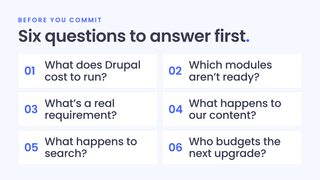
The questions to answer before you commit
Whichever way you lean, put these to your team and your current vendor first.
- What does Drupal cost us to run over three years? Count hosting, security patching, module maintenance, QA and the developer time attached to everyday changes, not just the upgrade.
- Which modules aren’t ready for Drupal 11? And what does replacing or rewriting them cost?
- How much of our complexity is a real requirement? Separate what the business needs from what the site has accumulated.
- What would a migration do to our content model? Content types, Paragraphs, Views, taxonomies and multilingual content all need a plan.
- What happens to search? Ask for the redirect and metadata plan, in writing.
- When is the next major-version upgrade, and who’s budgeting for it?
Work through it live
On Thursday, October 29 at 1:00 PM ET, we’re hosting The Drupal 10 Decision with Webflow, an enterprise briefing with live Q&A. Steve Lavigne and Mike Wiegand will compare the three-year cost of operating Drupal 11 and Webflow Enterprise, cover what Webflow Enterprise replaces, and show what needs to be re-architected when a mature Drupal site moves.