DRUPAL → WEBFLOW ENTERPRISE
Drupal Experts, moving Enterprises to Webflow.
Craft&Crew brings decades of Drupal experience to one of the biggest decisions an enterprise team can make: when, and how, to move on. We understand the platform you're leaving, just as well as the one you're moving to.


Drupal experience you won't find at a typical Webflow agency.
We're an enterprise web company with deep experience on both sides of the decision.
~25 YEARS
The history of the Drupal practice Craft&Crew acquired in 2023
60 PEOPLE
Size of the Drupal agency previously led by our President
DEEP DRUPAL EXPERIENCE
Strategy, architecture, development, support and maintenance
WEBFLOW ENTERPRISE
One of Webflow's select Enterprise Premium Partners
LET'S START HERE
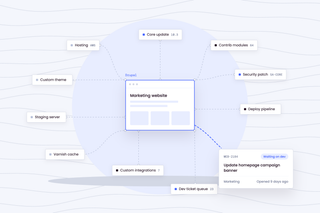
Drupal isn't a bad CMS.
Drupal has powered some of the world's largest, most complex websites for decades, and for good reason: it's flexible, extensible, open source and built for sophisticated content models, workflows and integrations. But for many enterprise marketing sites, the question isn't whether Drupal can do what you need. It's whether the development dependency, infrastructure and technical complexity that come with it are still necessary for the web operation you run today.
DRUPAL 11 OR WEBFLOW ENTERPRISE?
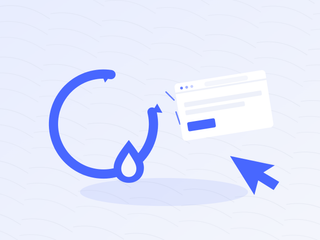
Migrate for growth, not a deadline.
Migrate because the operating model no longer fits. If Drupal meets your needs, your team runs it comfortably and its flexibility justifies the overhead, upgrading may be the right answer.
Our first step isn't recommending Webflow. It's understanding whether you should leave Drupal at all.
DEEP DRUPAL EXPERIENCE
A Drupal migration isn't a content export.
A mature Drupal implementation carries years of decisions about how content is structured, connected, published, governed and integrated with the rest of the organization.
Content architecture
Content types, fields, Paragraphs, taxonomies, entities, relationships and the structure that's accumulated around them.
Views & presentation
Views, Twig templates, themes, components, listing logic, filtering and front-end behaviour.
Modules & custom functionality
Contributed modules, custom modules, patches, dependencies and functionality that may have quietly become business-critical.
Publishing & governance
Roles, permissions, revisions, moderation workflows, multilingual content and approval processes.
Integrations
CRM, DAM, marketing automation, search, SSO, analytics, APIs, forms and downstream systems.
Infrastructure & operations
Hosting, environments, deployments, Composer dependencies, security updates, testing and the development resources required to keep everything running.
REPLATFORM. DON'T REPLICATE.
Don't rebuild Drupal in Webflow.
If we reproduce every content type, workflow, integration, exception and decade-old architectural decision exactly as it exists today, we've missed most of the value of replatforming. Instead, we ask: What does the business actually need now? Which content models still make sense? Which workflows exist because they're necessary — and which exist because Drupal required them? Which integrations remain business-critical? What should remain custom? What can now become native? What shouldn't migrate at all? The goal isn't to make Webflow behave like Drupal. It's to design a better web operation.
A DIFFERENT OPERATING MODEL
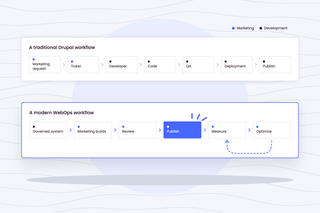
Same requirements. Less complexity.
Moving away from Drupal doesn't mean giving up the things enterprise organizations actually need. Security. Governance. Accessibility. Structured content. Localization. Integrations. Search. Scale. Reliability. The opportunity is to support those requirements with an operating model that gives marketing significantly more control over the day-to-day web experience.
THE BUSINESS CASE
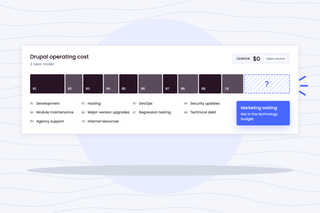
Drupal is open source. Running Drupal isn't free.
The cost of Drupal has never been the licence. It's the web operation around it.
We'll model the current Drupal operating cost against the future-state Webflow model over three years, including both direct technology costs and the people required to operate each.
MIGRATION METHODOLOGY
Weeks, not quarters
01. Understand the Drupal environment
Inventory content types, fields, Paragraphs, Views, taxonomies, modules, integrations, workflows, infrastructure, URLs, analytics and dependencies.
02. Separate requirements from legacy complexity
Determine what must survive, what should change and what doesn't need to make the trip.
03. Architect the Webflow future state
Define Collections, references, components, permissions, localization, integrations, governance and the new publishing model.
04. Map and migrate
Build explicit mappings between Drupal structures and the Webflow architecture. Use automation and AI where it improves speed and accuracy; keep experienced humans responsible for judgment.
05. Protect search equity
Inventory URLs, redirects, canonicals, metadata, structured data, internal links and high-value organic landing pages before cutover.
06. QA like the business depends on it
Content. Components. Integrations. Accessibility. Responsive behaviour. Analytics. Permissions. Redirects. SEO.
07. Cut over, monitor and optimize
Launch against a controlled plan, validate everything immediately and monitor organic performance, analytics and critical integrations closely after cutover.
ENTERPRISE MIGRATION
“We'll fix it after launch” isn't a strategy.
Enterprise migrations carry enterprise consequences.
A missed redirect can erase years of search equity. A misunderstood integration can interrupt lead flow. A broken content relationship can affect thousands of pages. A permissions mistake can create governance problems on day one.
That's why our migration process deliberately puts significant effort into planning, validation and QA before launch. We specialize in what we call no-fail mandates: projects where the website is important enough that getting it mostly right isn't good enough.
MIGRATION IS DAY ONE
Getting off Drupal isn't the goal.
Building a better-performing web operation is.
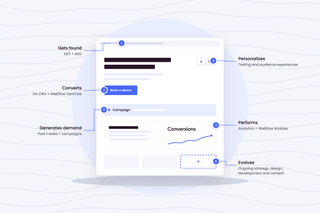
Once the new Webflow platform is live, the same Craft&Crew team can help you improve how it operates. Half of our team is focused on demand generation. Because we don't believe the measure of a successful migration is simply whether every page arrived.
It's what your organization can do once it gets there.
Built for regulated and complex sectors.
Drupal to Webflow Migrations.

Banking & Financial Services
Migrations that survive a security review. Data residency, audit trails, accessibility conformance, and change control documented before the first page moves.

Telecom & ISPs
Large estates, high traffic, and product catalogues that change weekly. We migrate without a freeze on the content your marketing team ships every day.

SaaS & AI
Fast-moving product pages, heavy experimentation, and a demand engine that cannot pause for a replatform. We migrate around the campaign calendar rather than through it.

B2B
Long buying cycles and a site that has to earn attention before a form is ever filled. Migrations that hold search rankings and improve conversion at the same time.
Common questions
Should we upgrade to Drupal 11 or move to Webflow Enterprise?
There isn't a universal answer. If your organization genuinely benefits from Drupal's flexibility and custom functionality, upgrading may make sense. If the website has accumulated unnecessary complexity and developer dependency relative to what marketing actually needs, replatforming deserves serious consideration. We model both options before recommending either.
Can everything we do in Drupal be done in Webflow?
No, and that's an important part of the assessment. Drupal can support highly customized application functionality and complex content relationships that may not map responsibly to Webflow. We identify those requirements early and determine whether they can be simplified, handled through integrations or custom applications, or mean Drupal remains the better platform.
What happens to our content types, Paragraphs and taxonomies?
They don't automatically become one-to-one Webflow structures. We first determine the business purpose behind the existing architecture, then map appropriate content into Webflow Collections, fields and references. Replatforming is an opportunity to simplify the content model rather than blindly reproduce it.
What about Drupal Views?
We inventory what each View is actually accomplishing; listing, filtering, relationships, contextual output, etc., and determine the appropriate Webflow or integrated solution. Some map cleanly to native patterns; others require a different approach.
Will we lose our organic rankings?
Any significant replatform carries SEO risk, and no responsible migration partner should promise otherwise. Our job is to minimize that risk through detailed URL mapping, redirects, metadata preservation, structured data, internal-link analysis, pre-launch crawling and close post-launch monitoring.
How do you handle custom Drupal modules and integrations?
We inventory custom and contributed modules based on the business functionality they provide, not simply whether an equivalent Webflow app exists. Required functionality may move to Webflow natively, an external platform, an API integration or remain custom.
How long does a Drupal-to-Webflow migration take?
It depends on the architecture, content volume, integrations, design requirements and governance complexity. Automation and AI can dramatically accelerate repetitive migration work, but we won't manufacture a timeline before understanding the environment.
NOT SURE YOU SHOULD LEAVE DRUPAL?
Good. Let's figure that out first.
Replatforming shouldn't start with a predetermined answer. We'll look at your current Drupal environment, understand what's working, identify what's creating unnecessary complexity and help you determine whether Webflow Enterprise actually makes sense.
If it does, you'll be talking to a team that understands both sides of the migration.
If it doesn't, we'll tell you that too.