WORDPRESS → WEBFLOW ENTERPRISE
We know WordPress. We know what's better.
For nearly 20 years, Craft&Crew has designed, developed, supported and managed large-scale WordPress websites for complex organizations. Today, we're one of Webflow's leading Enterprise Partners, and we're helping more enterprise marketing teams make the move. Not because WordPress suddenly stopped working. Because the way modern web teams need to work has changed.


WORDPRESS EXPERIENCE
WordPress experts, before it was obvious.
Long before Webflow existed, Craft&Crew was designing and developing large-scale WordPress websites.
We've built custom themes. Custom post types. Advanced Custom Fields. Integrations. Multilingual sites. Complex publishing systems. Enterprise hosting environments. And we've spent years supporting and evolving WordPress sites after launch
NEARLY 20 YEARS
Building for WordPress
700+
Enterprise web projects
TOP 1%
Webflow Enterprise Partner
PROVEN
WordPress → Webflow migrations

LET'S BE FAIR
The world's top CMS, for a reason.
Flexible, familiar, extensible and open source, WordPress can be adapted to support almost anything. We've spent nearly two decades building sophisticated sites with it, and we'll gladly say this: a well-built, well-maintained WordPress site can still be excellent.
The question is whether it's still the right operating model for you.
THE WORDPRESS STACK
You maintain a stack. You wanted a website.
A mature enterprise WordPress implementation isn't just WordPress. It's WordPress core plus everything the organization has assembled around it.
Theme & front end
Custom themes, child themes, page builders, component systems and years of front-end decisions.
Content architecture
Posts, pages, custom post types, taxonomies, custom fields, relationships and templates.
Plugins
Commercial plugins, open-source plugins, custom plugins and dependencies, with different vendors, release schedules and levels of support.
Publishing
Roles, permissions, editorial workflows, revisions, multilingual content and approval processes.
Integrations
CRM, marketing automation, DAM, search, forms, analytics, SSO and other business systems.
Infrastructure
Hosting, caching, CDN, backups, environments, deployment processes, monitoring, security and ongoing maintenance.
MORE THAN CONTENT MIGRATION
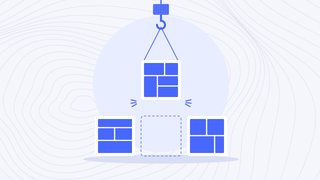
Not an export. A new operating model.
Before anything moves, we inventory what the current WordPress implementation actually does. Some things migrate. Some get rebuilt. Some disappear entirely. Knowing which is which is the migration strategy.
REPLATFORM. DON'T REPLICATE.
Don't let your new site inherit old decisions.
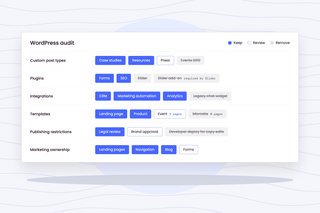
Years of WordPress development can leave behind structures that made sense once but no longer reflect how your organization works. A migration is the chance to ask:
Which custom post types still belong? Which plugins solve real business needs, and which exist only because another plugin required them? Which integrations still matter? Which templates are actually used? Which publishing restrictions are necessary? What could marketing own directly?
We're not recreating your WordPress stack in Webflow.
WHY WE'RE BETTING ON WEBFLOW
WordPress gives developers enormous flexibility. Webflow gives more of it to the web team.
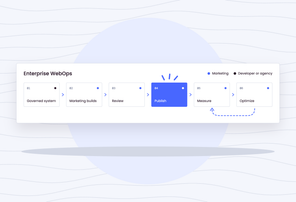
That's the shift. For the right enterprise marketing website, Webflow brings design, development, structured content, hosting, governance, optimization and experimentation into a more integrated platform. That means fewer moving pieces to manage, and fewer handoffs between wanting something changed and actually changing it.
TOTAL COST OF OWNERSHIP
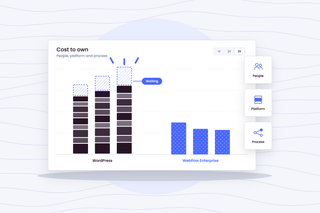
WordPress is free. Your WordPress operation isn't.
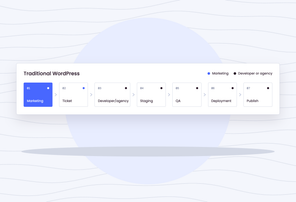
WordPress itself has no licence fee, but enterprise WordPress carries substantial costs around it: hosting, development support, plugin licences, security and maintenance, infrastructure, QA and regression testing, technical upgrades, internal web resources and agency retainers. Then there's the hardest cost to put on a spreadsheet, which is what it costs when marketing has to wait. Before recommending a migration, we can model your current WordPress operation against Webflow Enterprise over three years. That means more than licence versus licence: we compare people, platform and process.
Migration methodology
Weeks, not quarters
01. Audit the WordPress implementation
Content types, custom fields, taxonomies, plugins, themes, integrations, users, workflows, analytics, SEO and infrastructure.
02. Understand what everything does
Separate actual business requirements from WordPress-specific implementation decisions and accumulated technical debt.
03. Architect the Webflow future state
Collections, references, components, design system, integrations, permissions, localization and publishing workflows.
04. Map and migrate content
Create explicit mappings between WordPress structures and Webflow. Use APIs, automation, AI and Webflow's MCP where they improve speed and accuracy.
05. Reconnect the ecosystem
CRM, forms, analytics, marketing automation, search and other systems are rebuilt or reconnected intentionally.
06. Preserve search equity
URL mapping, redirects, metadata, canonicals, schema, internal linking, sitemap behaviour and high-value organic pages are addressed before cutover.
07. QA and launch
Content, functionality, accessibility, responsive behaviour, integrations, analytics, permissions, redirects and SEO are validated before launch.
08. Monitor and optimize
Crawl, analytics, search performance and critical integrations are monitored closely after cutover.
Built for regulated and complex sectors.
WordPress to Webflow Migrations.

Banking & Financial Services
Migrations that survive a security review. Data residency, audit trails, accessibility conformance, and change control documented before the first page moves.

Telecom & ISPs
Large estates, high traffic, and product catalogues that change weekly. We migrate without a freeze on the content your marketing team ships every day.

SaaS & AI
Fast-moving product pages, heavy experimentation, and a demand engine that cannot pause for a replatform. We migrate around the campaign calendar rather than through it.

B2B
Long buying cycles and a site that has to earn attention before a form is ever filled. Migrations that hold search rankings and improve conversion at the same time.
No-fail mandate
The bigger the WordPress site, the less room there is for “we'll fix it later.”
A mature WordPress website can have years of organic search authority, thousands of indexed URLs, complicated integrations and marketing campaigns that can't simply stop while a new platform launches. That's why we put disproportionate effort into migration planning, SEO preservation and QA. We specialize in no-fail mandates. A migration isn't successful because the homepage looks right on launch day. It's successful when traffic, leads, integrations, analytics and the business keep working.
MIGRATION IS DAY ONE
The best reason to leave WordPress is what happens next.
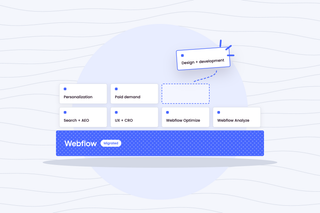
The goal isn't just fewer plugins. It's a web operation that lets your organization move faster. Once you're on Webflow, you can build on it with search and AEO, UX and CRO, Webflow Optimize and Analyze, personalization, paid demand generation, and ongoing design and development.
The migration gets you onto Webflow. WebOps is what you do with it.
Common questions
Is Webflow Enterprise actually a replacement for enterprise WordPress?
For many marketing-led enterprise websites, yes. But not universally. The decision depends on your content model, integrations, publishing requirements, custom functionality and the role the website plays in your broader technology ecosystem. We assess those requirements before recommending a platform.
What happens to our WordPress plugins?
We don't migrate plugins. We identify the business function each plugin performs. That capability may already exist in Webflow, reconnect through an integration, move to another specialized platform, require custom development, or no longer be necessary at all.
What happens to our custom post types and ACF fields?
We map the underlying content model rather than blindly recreating WordPress structures. Some custom post types translate naturally into Webflow Collections and references. Others benefit from being consolidated or restructured.
Can you migrate thousands of WordPress posts?
Yes, subject to Webflow's applicable platform architecture and limits. High-volume migrations are particularly well suited to automated workflows, but content volume is only one consideration. Relationships, taxonomy, media, redirects and metadata also need to be mapped and validated.
Will we lose our rankings?
Any major replatform introduces SEO risk. Nobody should promise otherwise. We minimize that risk through pre-migration crawling, URL mapping, redirect planning, metadata and structured-data preservation, internal-link analysis, QA and post-launch monitoring.
Is Webflow more secure than WordPress?
They're fundamentally different operating models. WordPress security depends partly on how the application, infrastructure, themes and plugins are maintained. Webflow operates as a managed SaaS platform, shifting much of that platform-level responsibility away from your organization. Your actual security and compliance requirements still need to be evaluated individually.
How long does a WordPress-to-Webflow migration take?
It depends on the size and complexity of the implementation. Content volume matters, but so do integrations, custom functionality, design requirements, SEO risk and governance. Automation can materially accelerate migration work; we scope the timeline after understanding the environment rather than promising “weeks, not quarters” universally.
Get the stack audit.
We'll audit your current WordPress implementation, understand the technology and resources required to operate it today, and map what a future state on Webflow Enterprise could look like.